
Key Takeaways
A construction time-lapse camera can create a useful visual record when its purpose and setup are planned early. The right approach depends on your site, project timeline and intended audience.
- Set clear goals for progress tracking, communication and project documentation.
- Choose equipment and power arrangements to suit site conditions and project duration.
- Plan camera position around work areas, changing layouts and safe access.
- Agree on capture schedules, image access, storage and privacy before filming begins.
- Compare installation, ongoing support and delivery terms when appointing a provider.
Why use a construction time lapse camera in Brisbane
A construction time lapse camera brisbane project teams can rely on begins with a clear purpose: what needs to be visible, who will use the images and when they need them. Brisbane sites vary in scale and setting, so the best setup will depend on the project rather than a standard template. A consistent visual record can complement site meetings and written reports, giving clients and teams another way to follow the work. It is worth considering how that record will be used from the first capture through to project close-out.
Track progress against project milestones
Images captured over time can help a team review visible changes against its construction programme. A carefully chosen view may show the sequence of work in a way that is difficult to convey from a single photograph or a written update. The record is most useful when project milestones and capture dates are kept clear, so reviewers can understand what they are seeing and when it occurred. For broader planning, the Brisbane time-lapse project guide covers defining goals, coordinating filming with a construction programme and planning for final footage.
Create visual records for clients and stakeholders
A visual record can give clients, consultants and project stakeholders a shared reference point for discussions about site progress. It may also help teams communicate changes between meetings, especially when stakeholders cannot attend the site regularly. The images do not replace formal project records, but they can provide useful context alongside them. Construction Time Lapse Specialists provides construction time-lapse photography and camera installations for projects across Brisbane and Queensland, with remote monitoring described as part of its service.
Support marketing, handover and project reporting
The same imagery may serve different purposes at different stages: progress reporting during construction, a final project story for marketing, or a visual reference at handover. Decide early which outcomes matter, as that can affect camera framing, capture frequency and the images you retain. A sequence with a consistent viewpoint is easier to review and present than a collection of unrelated shots. Treat the intended audience as a practical design choice, not an afterthought, when setting up the project.
Choose a camera system for your site
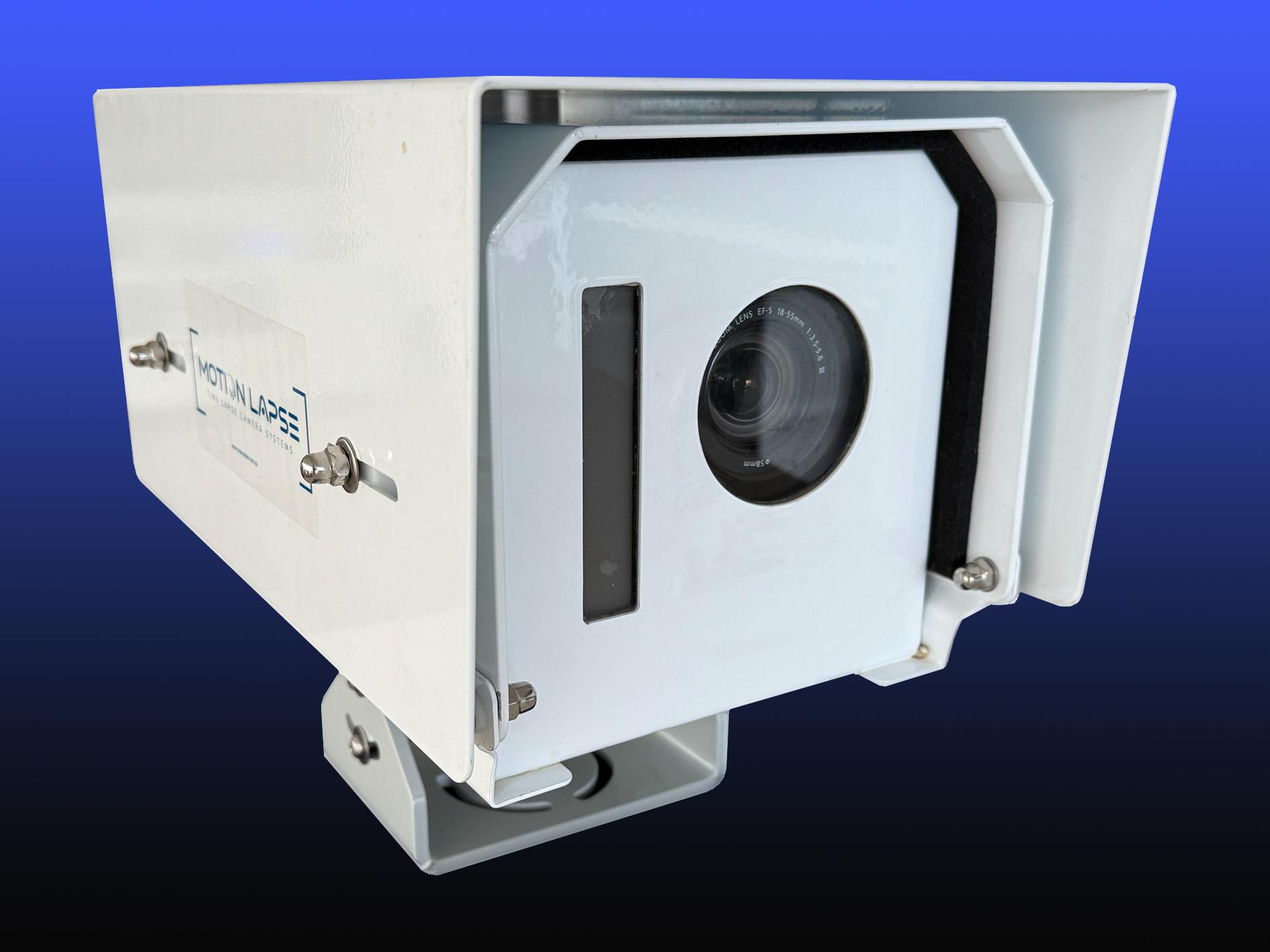
Equipment decisions should follow from the site conditions and the use planned for the images. Consider project length, access to power, available network coverage and whether the system will stay in one position. A fixed installation may suit a long programme, while a mobile arrangement can be relevant where the viewpoint needs to change. The table below is a starting point for comparing common setup types, not a substitute for checking the specific site.
Compare fixed, solar-powered and mobile setups
Each setup involves trade-offs between a stable viewpoint, the available power supply and the need to relocate equipment. A fixed camera can provide a consistent angle, while a solar-powered system may be considered where mains power is not convenient; suitability depends on the location and equipment. Mobile setups may be useful when the work area or preferred view changes. Compare the practical implications before choosing:
| Setup type | Potential fit | Points to check |
|---|---|---|
| Fixed | A stable view over a longer programme | Mounting position, power and ongoing access |
| Solar-powered | A site where mains power is difficult to reach | Exposure, system requirements and site conditions |
| Mobile | A project with changing viewpoints or work areas | Relocation process, access and continuity of framing |
Use these distinctions to shape questions for a provider, then confirm what the proposed equipment can support on your actual site. Construction Time Lapse Specialists describes its time-lapse camera systems as durable and offers 4K cameras; confirm the specifications and configuration appropriate to your project before appointment.
Match image quality to the finished video and reporting needs
The level of detail required depends on how the images will be reviewed and shared. A project team may need clear progress views for internal discussion, while a final presentation may call for a different output and editing approach. Construction Time Lapse Specialists says it provides 4K cameras and high-resolution photography, so ask how the proposed image capture relates to your intended reporting and final delivery. It is also useful to review sample footage and still images before setting expectations.
Check weatherproofing, power and storage requirements
A camera system needs to suit the exposure and operating conditions at its installation point. Check what weather protection is specified, how equipment will be powered and how images will be stored for the duration of the project. Storage and transfer arrangements matter as well: image frequency and resolution influence the volume of material collected. Establish who will monitor capacity and what happens if the system needs attention.
Decide whether you need live viewing or scheduled image delivery
Some teams want to check a site remotely, while others need periodic images for reports or stakeholder updates. These are different workflows, so clarify how often people will look at the material and who needs access. Construction Time Lapse Specialists describes remote monitoring and secure remote portal access for viewing site progress; discuss what access and image delivery are included for your proposed setup. Agree on an approach that supports the team without creating unnecessary review tasks.
Plan camera placement and installation
A useful installation begins with the work the camera needs to show. The view should remain meaningful as the project advances, and the equipment must be mounted with site safety and construction activity in mind. Walk the location with the programme and site layout available, rather than choosing a viewpoint from a plan alone. Early coordination can also reduce the chance that the camera becomes obstructed or difficult to service.
Select a position with a clear view of key work areas
Look for a stable position that captures the parts of the project relevant to the record, while avoiding a view dominated by temporary clutter. Consider sightlines across the site and whether the camera can remain securely mounted throughout the planned capture period. A higher viewpoint may offer wider coverage, but height is not automatically better if important work becomes too small to interpret. Test the framing against the project’s intended milestones before finalising the position.
Account for changing site layouts, cranes and obstructions
Construction sites change continuously. New structures, cranes, hoardings and stored materials can alter a view that was clear at installation, so think ahead about which elements may move or grow into the frame. Where possible, discuss likely changes with the construction team and identify an alternative position if the primary view becomes unsuitable. A viewpoint plan should balance continuity with the practical need to keep key work visible.
Arrange safe mounting without disrupting construction
Installation should be coordinated with site management so that mounting, access and any equipment work can be completed safely. Confirm who authorises the location, how installation activity fits around the programme and what procedures apply to working at height or near operating plant. A concise pre-installation review can help the provider and site team resolve practical matters before equipment arrives:
- Confirm the proposed mounting point with the site contact.
- Identify any access controls or induction requirements.
- Check that installation will not obstruct construction activity.
- Agree who to contact if the camera needs attention.
These checks make the installation plan easier to manage and help avoid avoidable interruptions. Keep the approved position and site contact details available to the people responsible for ongoing access.
Confirm access, power and network coverage before installation
A position that provides a good view still needs to be practical to reach and operate. Check whether the mounting point has a suitable power option and whether the required network coverage is available there. Confirm access arrangements for installation and maintenance, including any restrictions on working hours. For a Brisbane project, the camera placement and setup guide is a useful reference for viewpoint, weatherproofing, connectivity and site safety considerations.
Set capture and monitoring requirements
Capture settings affect both the usefulness of the record and the amount of material collected. Decide what progress needs to be visible, how the imagery will be reviewed and how long the project is expected to run. Then agree on a schedule that fits the construction programme and can be maintained through changes on site. Clear responsibility for monitoring and maintenance helps keep the record coherent over time.
Choose an image schedule that suits the project timeline
Capture frequency should reflect the pace of work and the intended use of the images. A steady schedule can help document gradual progress, while particular phases may call for a closer look at how the site changes. Discuss the construction programme and important milestones with the provider before setting a schedule. The aim is a consistent record that remains practical to store and review, rather than collecting images without a defined purpose.
Set up remote checks for camera status and image quality
Remote checks can help the responsible team notice when a camera is not recording as expected or when a view has become less useful. Establish who will review system status, how often they will do so and how any issue should be reported. Construction Time Lapse Specialists describes remote monitoring as part of its service, but project teams should still confirm the scope, notification process and responsibilities offered under their agreement. A clear routine makes it easier to respond before a gap becomes difficult to explain.
Plan for outages, maintenance and site changes
Even a well-planned system may need attention if power, network access or site conditions change. Decide how maintenance requests will be raised and who can arrange access to the camera location. It is also sensible to establish what happens to the capture schedule during an outage and how the team will record any resulting gap. These arrangements make the visual archive easier to interpret later, without implying that every interruption can be prevented.
Keep dates and project milestones consistent in the image archive
An archive is more useful when its dates, image sequence and project milestones can be understood together. Choose a naming or filing approach that the project team can maintain, and keep milestone descriptions consistent in reports and image records. Where several people review the material, agree on a common reference for dates and phases rather than relying on informal labels. This small discipline makes progress reviews and later retrieval more straightforward.
Manage footage, access and privacy
A visual record can include more than the intended work area, so access and privacy deserve attention from the outset. Agree who will view images, how they may be shared and how long the material will be retained. Consider the site boundary and nearby areas when choosing the camera’s direction and framing. These decisions help the record serve its project purpose without exposing information unnecessarily.
Set permissions for contractors, clients and project teams
Not everyone involved in a project needs the same access. Identify the people who need to view images, those who may share them and anyone responsible for administration. Confirm how access is granted or removed when project roles change, and make sure external stakeholders understand any limits on onward sharing. A simple permissions plan reduces uncertainty as teams and contractors change over the course of a build.
Protect stored images and shared links
Ask where images are stored, who can access them and how links are protected before sharing material beyond the core team. Use agreed channels rather than circulating access casually, and review permissions when a stakeholder no longer needs them. If a provider offers a portal or other remote access, confirm the applicable controls and responsibilities rather than assuming a particular security arrangement. Keep the handling process proportionate to the sensitivity of the footage.
Avoid capturing neighbouring properties or sensitive areas
The camera should be framed around the project, not directed unnecessarily toward neighbouring properties, public areas or sensitive site spaces. Review the view from the camera’s actual position and adjust it if it records more than the project needs. Site management can identify areas that should be excluded, including locations where work or personal information may be visible. If the site layout changes, review the framing again rather than treating the original view as permanent.
Agree on image ownership, retention and export formats
Before filming starts, document who can use the images and what happens to them when the project ends. Clarify the retention period, the process for requesting copies and the formats available for reports or presentations. These terms should be clear to both the project team and the provider, including any limits on use outside the original purpose. A written agreement is easier to apply than assumptions made during handover.
Budget and appoint a Brisbane provider
A project budget should account for the full service period, not only the initial equipment decision. Installation, ongoing support, image access and final delivery can all affect the overall value of a proposal. Ask providers to describe their inclusions in comparable terms and tie the response to your project’s duration and requirements. A well-scoped discussion can reveal important differences before a contract is signed.
Compare equipment, installation and ongoing service costs
Request a clear breakdown of equipment, installation and any recurring service charges. Check whether the proposed system, power arrangement and access method suit the site and project length. If a quote includes image production or other services, make sure those items are distinguished from camera operation. Comparing like with like helps the project team understand what is included and where additional costs may arise.
Check what support and maintenance are included
Support arrangements can matter as much as the equipment when a camera is expected to operate over a long programme. Ask who responds to faults, how site access is organised and whether routine checks or maintenance are included. Clarify expected response arrangements and any costs outside the quoted service. The answers should be reflected in the proposal so that the project team knows who is responsible once installation is complete.
Review sample footage from similar construction projects
Sample material can help you judge whether the framing, image detail and final presentation suit your intended use. Ask to see work that is comparable in scale or setting, and consider both the images and how they are organised for review. Construction Time Lapse Specialists describes its work as construction time-lapse photography and camera installations; request examples that reflect the type of record your project needs. This makes the discussion more specific than comparing equipment descriptions alone.
Confirm delivery timelines and contract terms
Before appointment, confirm the expected installation date, service period, image access arrangements and any final delivery dates. Read the terms for changes to the programme, early completion or extension, and establish how image exports will be requested. If you are ready to discuss site requirements, request a site consultation and outline the project timeline, location and intended use of the footage. A clear scope gives both sides a practical basis for planning the work.
Conclusion
A dependable construction time-lapse record depends on more than choosing a camera: it takes a clear purpose, a considered viewpoint, suitable capture and access arrangements, and a plan for handling the images. By checking these details against the project programme and site conditions, Brisbane teams can choose a system that supports progress visibility, communication and reporting from installation through to handover.