Key Takeaways
Remote construction site monitoring works best when its tools are chosen around the project’s needs and used alongside on-site supervision. A clear plan helps teams turn images and sensor readings into useful decisions.
- Match cameras and sensors to the site’s risks, duration and working conditions.
- Plan coverage, power, connectivity and access before installation.
- Use visual records to support progress reviews and communication, not replace site inspections.
- Agree who reviews alerts and footage, and how findings will be shared.
- Account for privacy, information security and the full cost of operating the system.
What remote construction site monitoring involves
Remote construction site monitoring gives project teams a way to view site activity and review captured information without being physically present at every moment. A system might use cameras, selected sensors or both, depending on what the project needs to observe. The value comes from making that information accessible and useful to the people managing the work. It supports, rather than replaces, site inspections and professional judgement.
How cameras and sensors capture site activity
Cameras provide visual views of selected work areas, while a time-lapse camera can capture images at intervals to help show how a project changes over time. Sensors can provide readings for specific conditions or equipment, but their usefulness depends on the sensor chosen and how it is installed. Neither type of device gives a complete picture of a complex site by itself. When selecting equipment, teams should be clear about what they need to see or measure and where that information will be used.
How live feeds, alerts and recorded footage work together
A live feed can help an authorised user check a view at a particular moment, while recorded footage and time-lapse images provide a record to review later. Where a system includes alerts, set them around conditions that someone can act on; too many low-value notifications can make important ones easier to miss. A project team can also define which information is kept, who can access it and when it should be reviewed. For environmental readings, air monitoring data offers a related example of information being made available remotely, although it is a separate monitoring purpose.
Which teams benefit from remote site visibility
Project managers, builders, developers and other stakeholders may all use remote views, but they will not necessarily need the same information. A site supervisor may need to check a specific work area, while a client representative may want a concise visual update on progress. The team should agree who owns monitoring tasks and how the resulting information fits into project reviews. For a wider overview of the approach, see this remote monitoring guide.
Key benefits for construction projects
The practical benefit of remote visibility is not simply that someone can open a camera view from another location. It can help teams notice changes, share a common visual reference and decide when a closer site review is needed. Construction Time Lapse Specialists provides time-lapse camera solutions and visual monitoring for construction projects, including remote portal access to view progress. The value of any monitoring arrangement still depends on suitable coverage and a clear process for acting on what it shows.
Improve safety oversight across active work areas
Remote views may help a manager check selected work areas between site visits, but they do not establish that every safety requirement is being followed. Camera placement, changing site layouts and temporary obstructions all affect what can be seen. Teams should use remote visibility as one input to their established safety processes, and arrange an in-person check whenever the situation calls for it. Where rooftop equipment is part of a project, guidance on ground-level solar checks illustrates why visual checks have limits and when a qualified professional may be needed.
Track progress and identify delays earlier
Regular visual records can make it easier to compare what is visible on site with planned milestones and discuss a change before it becomes a larger reporting issue. They do not confirm that work meets a specification or establish a measured completion quantity without the appropriate verification. For project teams, the useful question is how each record connects to a milestone, review or decision. Construction Time Lapse Specialists provides high-resolution time-lapse cameras and photography to capture project progress over time.
Reduce unnecessary site visits and travel
Remote access can help stakeholders answer some visual questions without making a separate trip, particularly when they need to check a view or follow a known milestone. It is not a substitute for visits needed for inspection, coordination or professional assessment. A simple way to decide whether a visit can be avoided is to identify its purpose first:
- Is the question visual, and can the available camera view answer it?
- Does the decision require a physical inspection or a measurement?
- Who will review the remote information and follow up if it raises a concern?
- How will the outcome be recorded and shared with the people involved?
This small check keeps remote access in its proper role: useful for routine visibility, but not a reason to skip necessary site work.
Strengthen security and incident response
Cameras may contribute to site security by providing a view of selected areas, but they are only one part of a response plan. Teams need to decide who receives a notification, who is responsible for checking it and what to do if an incident is suspected. Coverage should be reviewed as the site changes, particularly when access routes or storage locations move. For issues such as recurring bird activity around equipment, bird exclusion planning is a separate site-management consideration that may require assessment and physical measures rather than camera visibility alone.
Choosing the right monitoring technology
Equipment should follow the project question, not the other way around. A camera intended to capture long-term progress has different needs from one intended to provide a live view of a particular area, and sensors only help when their readings inform a real decision. Construction Time Lapse Specialists offers time-lapse cameras, drone imaging and high-resolution photography for construction projects; the right combination depends on the project and its capture requirements. The table below is a starting point for comparing common approaches, not a substitute for checking a proposed system against site conditions.
Compare fixed, mobile and time-lapse cameras
A fixed camera gives a consistent view from one location, while a mobile unit can be repositioned as work areas change. Time-lapse capture is useful for reviewing visual change across a longer period, provided the camera remains suitably placed and the capture plan is consistent. Consider the intended use, site duration and access needs before settling on a setup.
| Approach | Useful for | Considerations |
|---|---|---|
| Fixed camera | A stable view of a defined area | Check for obstructions as the site changes |
| Mobile camera | Coverage that needs to move with activity | Plan how and when it will be repositioned |
| Time-lapse camera | Reviewing visible progress over time | Keep placement and capture arrangements suitable |
| Drone imagery | Aerial views of selected project stages | Plan capture around site operations and permissions |
The best choice may be one approach or a combination, depending on what the project needs to document. For longer-term visual records, construction time-lapse photography is one example of capturing project stages over time.
Assess sensors for environmental and equipment monitoring
Sensors should be selected for a defined monitoring purpose, such as observing an environmental condition or a particular piece of equipment. Confirm what the device measures, how often it reports and who is expected to respond to an unusual reading. Do not assume that a sensor provides context beyond its recorded data. If an alert suggests a problem, a person may still need to investigate it on site.
Check power, connectivity and weatherproofing requirements
A suitable camera location is of little use if the equipment cannot remain powered or transmit information reliably. Check the practical route for power and connectivity, the expected signal at the proposed position and the equipment’s suitability for the site environment. Account for installation access and maintenance as well as initial setup. These details are especially important where the site layout or working conditions may change during the project.
Match features to site size, duration and risk
A small, short-duration project may need a different arrangement from a large civil or infrastructure site with changing work fronts. Match the number and type of views to the decisions teams need to make, rather than trying to capture everything. Also consider how long records need to remain available and who will use them. A clear fit between project need and system scope helps avoid paying for features that do not support the work.
Planning and installing a monitoring system
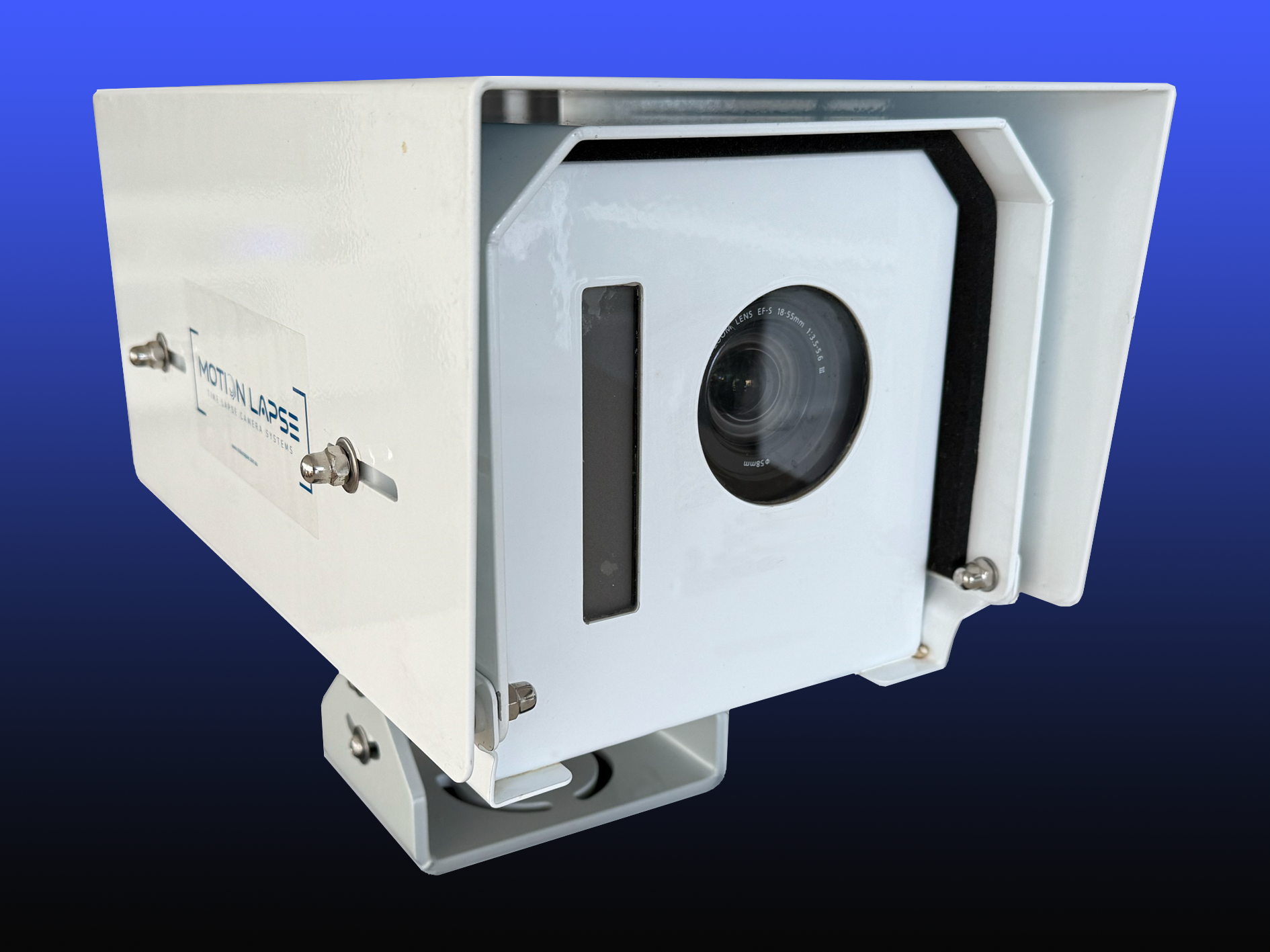
Good installation begins with agreement on what the system is meant to help the team see and do. Before equipment is chosen, identify the project’s priority locations, stakeholders and reporting rhythm. Construction Time Lapse Specialists provides camera installations and remote monitoring for construction projects, with system selection and placement needing to suit each site. A practical site camera setup guide can also help teams think through coverage, power, connectivity and access.
Define project goals and success measures
Describe the decisions the monitoring system should support, such as reviewing visible progress at agreed milestones or providing access to selected work areas. Then decide how the team will judge whether it is useful: for example, whether the intended views remain available and whether the records are ready for scheduled reviews. Keep measures tied to project practice rather than treating camera uptime as proof of construction performance. Clear goals also make it easier to explain the system’s purpose to site personnel and stakeholders.
Choose camera locations and fields of view
Select positions that provide a useful, stable view of priority activity while considering how the site will develop around them. Check for likely obstructions from structures, plant or temporary works, and make sure the camera is not pointed into areas that do not need to be monitored. Where aerial imagery is part of the plan, coordinate capture with site operations and relevant permissions. Review the proposed views with people who understand the site before finalising the layout.
Coordinate installation with site operations
Installation needs to fit around access controls, active work and any other site requirements. Agree timing and responsibilities with the relevant site team, and make sure installers can reach the proposed positions safely. Plan how the system will be maintained or adjusted if the site changes. A quick handover should also clarify who has access and who to contact if a view or connection stops working.
Test coverage, alerts and user access before relying on the system
Testing is the point to confirm that the views are usable, the intended people can access them and any configured notifications reach the right recipient. Check the system under realistic conditions, including changes in light or activity where relevant. If alerts are enabled, confirm that their thresholds are meaningful and that a named person understands the follow-up process. Document any gaps, adjust the setup and only then include the system in routine project workflows.
Using monitoring data in daily operations
Monitoring information becomes useful when it is reviewed at a consistent point in the project’s working rhythm. Decide what belongs in a daily check, a milestone review or a stakeholder update, and avoid collecting records that nobody has time to interpret. Visual material can support conversations about progress, but measurements, inspections and formal records remain necessary where the decision depends on them. A reporting framework can help structure that conversation; management reporting frameworks describes options for connecting information to decisions.
Set up dashboards and practical alert thresholds
A dashboard should make relevant information easy to find rather than simply displaying every available feed or reading. Group views and readings by project need, and keep alert thresholds tied to a response someone can take. Review settings after site conditions change, since an old threshold may no longer be useful. A well-set alert process helps teams distinguish a prompt for attention from information that can wait for a scheduled review.
Share updates with contractors and stakeholders
Different audiences need different levels of detail. Contractors may need a specific view or update tied to current work, while clients may prefer a short visual summary of a milestone. Agree who prepares updates, how often they are shared and which information should be kept within the project team. When a monitoring room or shared workstation is used, practical surveillance-room layout ideas about sightlines and reducing distractions may support focused review, without changing the need for sound operating procedures.
Use visual records to verify progress and resolve disputes
Dated images can help establish what was visible at a particular point and give people a shared reference when discussing changes or events. They are supporting records, not automatic proof of quality, quantities or contractual responsibility. Keep records organised so that project teams can identify the relevant date, location and context. For decisions with contractual or technical consequences, pair visual material with the appropriate inspection records and professional review.
Review footage and sensor data consistently
A consistent review routine is more useful than checking information sporadically without a clear purpose. Teams can establish a short sequence for routine review:
- Check whether priority camera views are available and still unobstructed.
- Review planned progress points against the current programme.
- Follow up on alerts or unusual readings with the responsible person.
- Record relevant findings and share them through the agreed project channel.
The sequence can be adjusted to suit the project, but assigning responsibility matters. If the system is used to track activity around digital campaign links shared in updates, privacy-conscious link tracking is a separate analytics topic; it should not be confused with site monitoring data.
Managing privacy, security and costs
A monitoring plan should state what is captured, why it is collected and who may view or retain it. That clarity helps teams balance useful project visibility with worker privacy and responsible information handling. Costs also extend beyond buying or hiring equipment: connectivity, installation, maintenance and service arrangements can all affect the total. A proportionate system is one whose benefits and responsibilities are understood before it becomes part of daily operations.
Protect footage with access controls and secure storage
Limit access to people who need the information for their role, and use appropriate account permissions and secure storage arrangements. Agree how long footage and images will be retained, how access will be reviewed and what should happen when a staff member changes role. Keep a record of the agreed process so that sharing does not become informal or difficult to control. Security measures should reflect the sensitivity of the material and the way it is used.
Respect worker privacy and communicate monitoring practices
Explain the purpose and scope of monitoring to the people who may be recorded, including where cameras are positioned and how footage is used. Avoid capturing areas that are not needed for the project purpose, and consider whether a proposed view can be narrowed. Be clear about who can access records and how concerns can be raised. Respectful communication supports trust and gives workers a better understanding of what the system can and cannot do.
Estimate equipment, connectivity and ongoing service costs
Build a cost estimate that includes the full operating period, rather than focusing only on equipment. Depending on the setup, account for installation, connectivity, access or service fees, maintenance and any changes needed as the site develops. Confirm the terms for equipment removal and record access at project completion. Comparing these items with the project’s actual monitoring goals makes the budget more meaningful.
Measure value through time saved, risk reduction and project outcomes
Review value using evidence the project can reasonably observe, such as whether remote checks reduced avoidable travel or whether visual records helped resolve a progress question. Do not assume a camera alone prevents incidents or delays; outcomes depend on site conditions and the actions people take. Compare the time and cost of operating the system with the decisions and records it supports. The review can then inform whether to continue, adjust or close out the monitoring arrangement.
Conclusion
Remote construction site monitoring is most effective when its purpose, coverage and responsibilities are clear. Cameras and sensors can improve visibility and provide useful records, but they work best alongside site inspections, sound communication and professional judgement. Choose a system that fits the project, test it before relying on it and review how well it supports day-to-day decisions. To explore visual monitoring options for a construction project, talk through your project with the team at Construction Time Lapse Specialists.